[
](https://substackcdn.com/image/fetch/$s_!U99m!,f_auto,q_auto:good,fl_progressive:steep/https%3A%2F%2Fsubstack-post-media.s3.amazonaws.com%2Fpublic%2Fimages%2F365f1648-8363-415e-9649-6fbaab3c8d38_3298x1664.png)
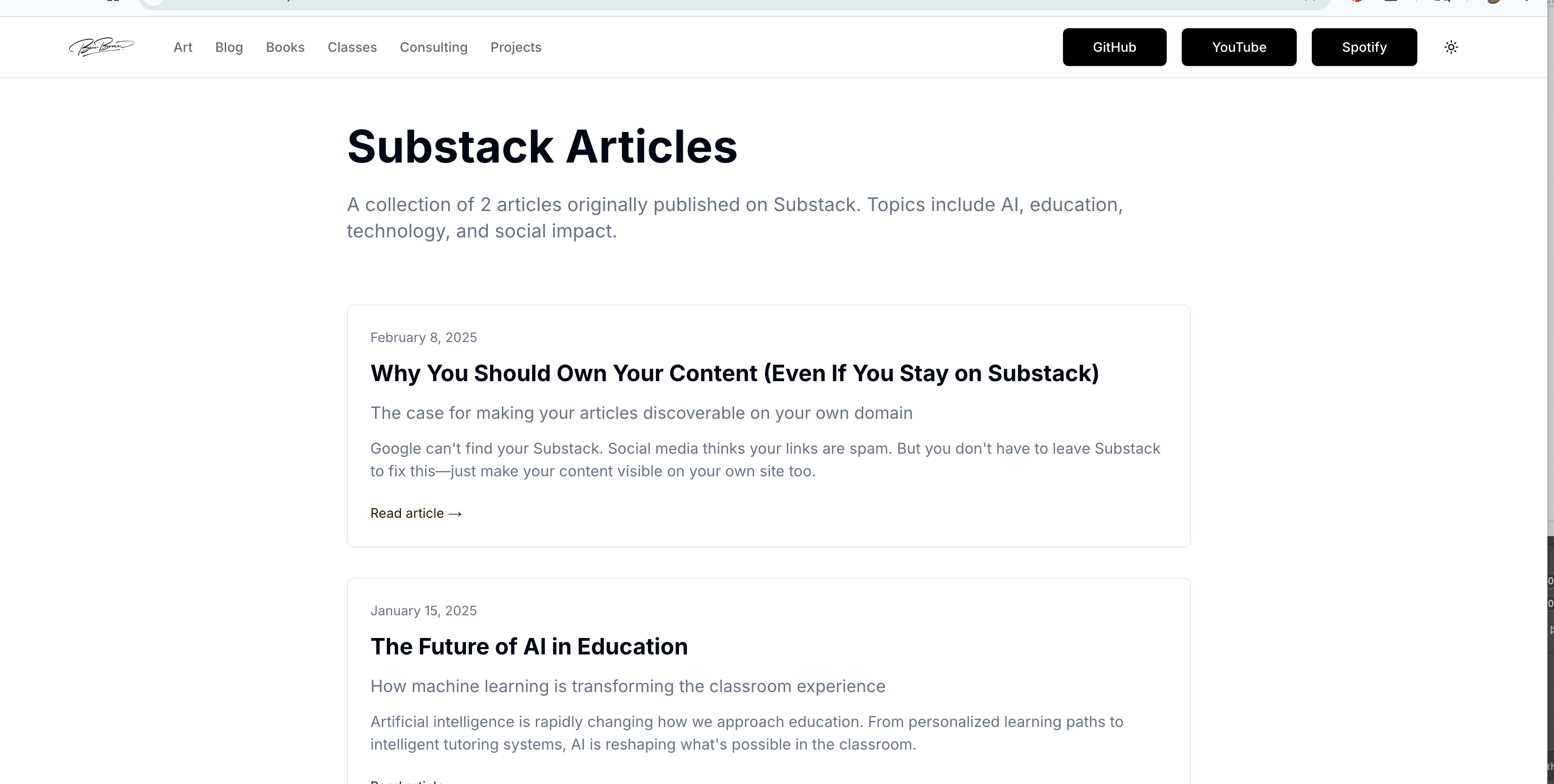
View how this tool looks on Nik Bear Brown .comhttps://www.nikbearbrown.com/substack
Keep Your Newsletter, Own Your Discovery
Wait, why would I need this? I already have Substack.
Good question! Here’s the thing: Substack isexcellentat email delivery, but it has three hidden problems that kill your growth:
**Google can’t find you.**Seriously. Substack deliberately removes sitemaps for smaller newsletters. Your articles just... don’t exist to search engines.
**Twitter thinks your links are spam.**No preview cards. Reduced visibility. Your shares look broken.
**Platform discovery is mostly theoretical.**Unless you paywall everything, you’re invisible in Substack’s discovery features.
That’s... pretty bad. So I should leave Substack?
Nope! That’s the beautiful part. YoukeepSubstack for what it’s good at (email delivery, payments, comments), but youalsoput your articles on your own domain. Best of both worlds.
Okay, but how does that even work?
Let me walk you through it. Imagine you write an article on Substack about, say, AI in education. Here’s what happens:
Current reality:
Your 500 email subscribers get it ✅
Someone googling “AI classroom tools”? They’llneverfind your article ❌
You share on Twitter? Looks like spam, gets buried ❌
People browsing Substack discover it? Only if you’re in the top 1% ❌
With this converter:
Your 500 email subscribers still get it ✅
Someone googling “AI classroom tools”? Your article shows up! ✅
You share on Twitter? Working preview card, looks professional ✅
Plus: your own SEO, your own design, your own control ✅
Wait, so I’m maintaining two sites now?
Not really. Here’s the workflow:
``1. Write on Substack (like always)
2. Once a month: Export → Run script → Push to GitHub
3. Done. Everything auto-updates.
Three commands, takes 2 minutes. The script does all the heavy lifting.
Okay, you lost me. What script?
Right, let me zoom in. When you export from Substack, you get a ZIP file full of HTML files and CSVs. Not exactly user-friendly. The converter is a Python script that transforms all that into clean, React-friendly MDX files.
MDX? Is that some new JavaScript framework I have to learn?
Ha! No. MDX is just Markdown (which you probably already know) that can include React components. Think of it like this:
Markdown:# My Heading→ simple text formatting
MDX:# My Heading+ you can drop in interactive charts, buttons, whatever
But here’s the key: you don’twriteMDX. The scriptcreatesit for you from your Substack HTML.
So the script converts HTML to MDX. Then what?
Then Next.js (a React framework) reads those MDX files and turns them into beautiful web pages. You get:
An archive page listing all your articles
Individual article pages with proper URLs
SEO metadata (titles, descriptions, Open Graph tags)
Links back to the original Substack version
All automatically generated from your MDX files.
This is starting to make sense, but... how does Next.js know how to find my articles?
Great question! This is where it gets clever. The setup uses something called “dynamic routing.” Here’s the folder structure:
``app/
  substack/
    [slug]/
      page.tsx     ← This handles ANY article
    page.tsx       ← This is your archive
  _content/
    substack/
      why-own-your-content.mdx
      ai-education-future.mdx
      metadata.json
See that[slug]folder? The brackets mean “this is a variable.” So when someone visits:
``yoursite.com/substack/why-own-your-content
Next.js says: “Okay, slug = ‘why-own-your-content’, let me find that MDX file and render it.”
Wait, what’s a slug?
A slug is the URL-friendly version of your title. The script automatically creates them:
``"Why You Should Own Your Content"
  → "why-you-should-own-your-content"

"The Future of AI in Education"
  → "future-of-ai-in-education"
It removes special characters, converts spaces to hyphens, makes everything lowercase. Standard URL stuff.
Okay, but where does the actual content come from? The MDX files?
Exactly! Each MDX file has two parts:
1. Frontmatter(metadata at the top):
yaml
``---
title: "Why You Should Own Your Content"
date: "2025-02-08"
slug: "why-own-your-content"
excerpt: "Google can't find your Substack..."
substackUrl: "https://substack.com/@nikbearbrown"
---
2. Content(the actual article):
markdown
``# Why You Should Own Your Content

After 3.5 months on Substack, I learned three hard truths...
The conversion script generates this automatically from your Substack export.
And themetadata.jsonfile?
That’s the index for your archive page. It lists all your articles in one place:
json
``{
  "articles": [
    {
      "title": "Why You Should Own Your Content",
      "slug": "why-own-your-content",
      "date": "2025-02-08",
      "excerpt": "Google can't find your Substack..."
    },
    {
      "title": "The Future of AI in Education",
      "slug": "ai-education-future",
      "date": "2025-01-15",
      "excerpt": "Artificial intelligence is rapidly..."
    }
  ],
  "totalCount": 2
}
The archive page reads this JSON and displays all your articles in a nice grid.
So the flow is: Substack HTML → Python script → MDX + JSON → Next.js → Live website?
Perfect! You’ve got it. And here’s the best part: Vercel (the hosting platform) watches your GitHub repo. When you push new MDX files, it automatically rebuilds and deploys your site. You literally just:
bash
``python3 convert_substack.py my-export.zip
git add .
git commit -m "Update articles"
git push
And 60 seconds later, everything’s live.
Dizzy again. Let’s back up. What’s Vercel doing exactly?
Vercel is like a super-smart web host. When you connect your GitHub repo to Vercel, it:
Watches for changes to your code
When you push, it runsnpm run build
This builds all your pages (the archive + individual articles)
Deploys them to a CDN (fast global servers)
Your site is live atyourname.com/substack
All automatic. You never touch it after initial setup.
And the build process... what’s that actually doing?
During the build, Next.js does something called “static generation.” For each MDX file, it:
Reads the frontmatter and content
Converts the Markdown to HTML
Wraps it in your React components (headers, footers, styling)
Generates a static HTML file
Creates all the proper<meta>tags for SEO
So when someone visits your article, they get a pre-built HTML file. Fast as lightning. Google can crawl it. Social media can preview it. No database queries, no waiting.
TL;DR?
**The problem:**Substack doesn’t show up in Google, social links look broken, platform discovery doesn’t work.
**The solution:**Keep Substack for email, butalsodisplay your articles on your own domain using this converter.
How it works:
Export your Substack (one click)
Run the Python script (converts HTML → MDX)
Push to GitHub (triggers Vercel deploy)
Your articles are now live with proper SEO
What you get:
✅ Substack’s email delivery
✅ Google indexing (organic traffic!)
✅ Working social previews
✅ Your own branding and design
✅ Full content ownership
The technical stack:
Python script for conversion
MDX files for content
Next.js for rendering
Vercel for hosting
GitHub for version control
One last question: Why Python for the converter instead of JavaScript?
Excellent catch! I chose Python because:
**Better HTML parsing:**Python’shtml.parseris robust and built-in. JavaScript’s HTML parsing in Node can be finicky.
**File system operations:**Python’spathlibandzipfilemake it trivial to extract and process the Substack export.
**String manipulation:**Python excels at text processing. Converting HTML → Markdown requires a lot of regex and string operations.
**Standalone tool:**You run it once to convert, then you’re done. It doesn’t need to be part of your React app.
Here’s the core logic simplified:
python
``def convert_html_to_markdown(html):
    """Convert HTML to Markdown"""
    # Parse HTML into a tree
    # Walk the tree node by node
    # Output Markdown equivalents

    '<h1>Title</h1>' → '# Title'
    '<strong>bold</strong>' → '**bold**'
    '<a href="url">link</a>' → '[link](url)'
The script processes each post, extracts metadata from the CSV, converts the HTML content, adds frontmatter, and saves as MDX. About 250 lines of Python does what would take 500+ lines of JavaScript.
Yikes. That’s a lot of string manipulation.
It is! But that’s what computers are for. Here’s the beautiful part: you run itoncewhen you want to update your articles. The rest of the time, your Next.js site just serves pre-built HTML. Fast, simple, SEO-friendly.
So this whole system is just solving Substack’s SEO problem?
NotjustSEO. Think about it holistically:
**Ownership:**Your content lives in Git. If Substack changes their terms or goes away, you have everything.
**Portability:**The MDX files work with any React framework (Next.js, Gatsby, Remix). You’re not locked in.
**Customization:**Want a different design? Custom interactive components? Analytics? It’s your site, do whatever you want.
**Discovery:**Google finds you. Social media shares work. People can link directly to articles without hitting Substack’s walls.
**Performance:**Static generation means your articles load in milliseconds. Substack’s pages are heavier.
But yes, theprimaryproblem this solves is:Substack makes you invisible to the web. This makes you visible again.
Final question: What if I don’t know React or Next.js?
You don’t need to! The repo includes:
Working demowith 2 example articles
Complete setup guidewith exact commands
One-click deploy buttonfor Vercel
Copy-paste readycode
The workflow is:
bash
``git clone https://github.com/nikbearbrown/Substack-to-React-Converter.git
cd Substack-to-React-Converter
npm install
npm run dev  # See it working locally
Then when you’re ready to deploy:
bash
``vercel # Done. Site is live.
You can run the whole thing without touching a single line of code. The Python script, the React components, the styling-it all just works.
And when I want to add my real articles?
bash
``python3 convert_substack.py ~/Downloads/my-export.zip
git push
Two commands. Vercel deploys automatically. Your articles are live.
The Bigger Picture
Here’s what this is really about:the internet works best when creators own their platforms.
Substack is atoolfor email delivery. It’s good at that! But it’s not good at making you discoverable. By putting your articles on your own domain too, you’re:
Building long-term SEO equity (every article strengthens your domain)
Creating a portfolio that’s fully yours
Making your content accessible to theentire web, not just email subscribers
Preparing for whatever comes next (AI search, new platforms, etc.)
And the best part? You don’t have toleaveanything. Keep your Substack. Keep your email list. Keep your payments. Just... also own your discoverability.
That’s what this converter does. It gives you the best of both worlds.
TL;DR of the TL;DR:
Make your Substack articles discoverable on Google. Keep Substack for email. Use this converter to put articles on your domain. Three commands, automatic updates, full SEO.
Your content deserves to be found.
Try it yourself:https://github.com/nikbearbrown/Substack-to-React-Converter