Agents and Frameworks
What an agent is (a model in a loop), and how to point an agent SDK, LangChain and Claude Code at Meta's Muse Spark, including how to run one unattended and which oddities to expect.
Agents and Frameworks
What an agent is (a model in a loop), and how to point an agent SDK, LangChain and Claude Code at Meta's Muse Spark, including how to run one unattended and which oddities to expect.
You come away knowing what the framework owns and what the model owns, the three settings any tool needs (base URL, API key, model ID), how to tell when an unattended run is finished, and what Meta's own troubleshooting table says to expect.
Honest about how it was made: this film was drafted in Muse and then cleaned up and rebuilt with Claude. The film uses today's names (the Agent SDK) next to the course's, notes the course ran Spark 1.2 while Meta's docs now give 1.3, and removes outcome claims the record does not support. The wrapper script on screen is built from Meta's documented settings, and the film says so.
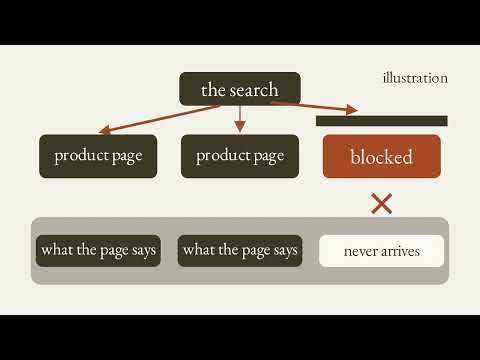
A note that opens the film Muse drafted this, Claude cleaned it up. This film began as a rough draft made with Muse. Muse runs on a simple model called Spark, and Spark makes a lot of mistakes, so Claude cleaned the draft up. The method is the point: draft in Muse, then finish in Claude or Codex. One kind of mistake we looked for: a draft Muse diagram of two big boxes and a check mark under a question about whether a non-technical person could use it, with both boxes empty. A diagram that shows nothing teaches nothing, so Claude replaced diagrams like this one.
Narrated by Liam, in for Bear. Narration is an AI voice; the film was made with AI tools.
Chapters 0:00 Muse note 0:28 The idea and the key terms 1:01 The Loop 1:55 The Agent SDK 2:54 Running It Unattended 3:36 LangChain 4:55 Claude Code On Muse 6:11 Works, But Odd 7:03 Recap 7:25 Your Turn
Your turn Paste this into Claude: I want to point [name a coding agent or framework I already use] at Meta's Muse Spark. Give me a checklist of the three settings it needs: base URL, API key, and model ID, and for each one say where that tool reads it. Then list two things that might look odd once it runs. Don't invent setting names; tell me when you are unsure. Then check two things yourself. Does it say where each of the three settings goes? And does it say when it is unsure, instead of inventing a setting name?
Sources shown on screen Meta's public docs at dev.meta.ai (agent frameworks, coding agents, basic agent loop, reasoning, SDKs), Anthropic's Agent SDK overview, and LangChain's ChatOpenAI integration page, captured 2026-10-07. Narration follows a Muse course taught by Andrew Brown, named on screen. Nothing here is a product endorsement.
Part of the playlist Muse for Educational AI.
@NikBearBrown
What this video covers
- 0:00 — Muse note
- 0:28 — The idea and the key terms
- 1:01 — The Loop
- 1:55 — The Agent SDK
- 2:54 — Running It Unattended
- 3:36 — LangChain
- 4:55 — Claude Code On Muse
- 6:11 — Works, But Odd
- 7:03 — Recap
- 7:25 — Your Turn
Transcript
A lightly formatted transcript of the video, with timestamps so you can jump to any section on YouTube.
Muse note
[0:00] A note before we start. This film began as a rough draft made with Muse. Muse runs on a simple model called Spark and Spark makes a lot of mistakes. So Claude cleaned this draft up. The method is the point. Draft and Muse then finishing Claude or Codeex. Here is the kind of mistake we look for. A draft diagram from Muse. Two big boxes and a check mark under a question about whether a non-technical person could use it. Both boxes are empty. A diagram that shows nothing teaches nothing. So Claude replaced diagrams like this one.
The idea and the key terms
[0:28] Hello, this is Liam in forbear. Agent tools like clawed code were built around one company's model. This lecture is about swapping the model underneath pointing the agent tools you already use at Meta's Muse Spark and what changes when you do. Six terms. An agent loop. A model that picks a tool reads the result and repeats. An agent SDK. A library that runs that loop for your code. A framework. A library that wires models and tools together. A harness. A readymade agent program built around a model. A wire format. the shape of a request and a base URL where that request is sent. An agent is a model in
The Loop
[1:02] A loop. You hand it a task. It reads, thinks, calls one tool and observes the result. Then comes one question, done or another turn. Meta's own cookbook draws this loop. The cookbook adds guards, an iteration cap, a token budget, stuck detection, and a way for you to cancel. A run can end five ways, and only one of them is success. Here is one real run from that cookbook with Muse Spark inside open code. Read the test. Search. Read the code. Edit it. Run the test. Five turns. One tool each. And a passing test says done. Who owns that loop? Meta's guide says the agent framework does. It sends your instruction to the model, receives tool call requests, runs them, feeds back the results, and repeats. Muse Spark decides each step. Muse needs three things from you like any client. A base URL and a PI key and a model ID. The rest of this lecture is how each tool accepts those three. Start
The Agent SDK
[1:55] With the agent SDK. Enthropics docs call it clawed code as a library. The same tools and agent loop. The course says enthropic agent SDK. Today it is named the Claude agent SDK. Meta documents this exact pairing. The SDK speaks Enthropics messages format. So it reaches Muse through Meta's messages API and Muse Spark decides what happens at each step. In environment variables, the base URL is just the host api.ai AI no/v1 the SDK add/v1/ messages itself. Your key is a bearer token plus the model name. Here is Meta's own example. A prompt then options. The model a working folder. A system prompt and allowed tools. Read edit and bash. Bypass permissions means nobody approves each step so it runs unattended. In the course, Andrew Brown gave it a different job. Write tic-tac-toe in Ruby. In the code, the task is just the prompt. The tools, the loop, and the model settings stay as they are. Now, the part a demo skips
Running It Unattended
[2:56] Knowing when it's finished. Meta says, "Wait for the result message, not for the stream to go quiet." It holds the final answer and token usage. No result means failure. Set two timeouts and overall clock cap stops a runaway loop. An idle watchdog resets on every event, so it catches a silent hang without cutting off a long turn. Dropping the approval step is only safe inside a sandbox. Meta says to run the agent in an operating system sandbox with its own working folder and a scrubbed environment and to give it only the tools it needs. Two more habits. Read token usage from the final result to track spend and retry drop streams with back off instead of failing the whole
LangChain
[3:36] Run. Now lang chain a framework for wiring models and tools together. Meta's SDK page says any open AI compatible library or framework works with its API and names lang chain. The course used it in Typescript. Langchain's own docs agree from their side. Chat open AI is fully compatible with Open AI's chat completions of PI and that is how they say to connect other providers that speak it. The setting is one line. Pass a configuration object with a base URL and the client sends its requests there. The docs use a placeholder address and an open AI model name. You swap in metas. Map the three settings across. Base
URL goes in configuration. Model ID in the model field. The key goes where the library looks. Lang chains docs read open i_apiore key. Met as examples use model underscore a pi underscore key. Lang chain can also use the responses of pi with one flag. Use responses of pi set to true. It routes there on its own when you use a responses only feature. Why that choice matters comes at the end. Most setup errors are small for a not found or 4004 meta's table names two suspects, a wrong model ID or a trailing slash on the base URL. In the course, Andrew had the agent SDK debug his lang
Claude Code On Muse
[4:55] Chain setup. Claude code is a different door. It speaks anthropics messages format, so it connects through Meta's messages of PI. Codeex uses the responses of PI. Open code can use responses or chat completions. Same model behind all three. Meta lists the settings. The base URL is just the host. The O token is your meta key sent as a bearer token. The model is Muse Spark 1.3. Today the course ran 1.2. One catch. Claude code picks models by alias. Plan mode sub aents and background chores like summaries route through Opus Sonnet or Haiku. Meta serves Spark not clawed models. So pin every alias to it or a
Task reaches for a clawed model that isn't there. Put it all in a wrapper script. Export the settings. Then launch claude code. The courses wrapper injected the meta key from the environment. This version is built from Meta's documented settings shown not run. Once it launches, Meta's table says the working parts carry over. File edits, shell commands, tool calling, images, and PDFs. MCP tools need one extra setting. Tool search switched on. The courses test was a small refactor. Claude Code owns the loop. It reads, edits, and runs commands. Muse Spark decides each step. The harness is anthropics and the model in the chair is Meta's. The course's
Works, But Odd
[6:12] Verdict, it works, but it looks odd. Meta's troubleshooting table lists the oddities to expect. Duplicate tool calls. A cost readout stuck at $0. An agent that says it can't view images. The deepest oddity is reasoning. Over the responses, a PI sparks reasoning can carry from turn to turn. Over chat completions, it can't. So, every turn thinks from scratch. And Meta warns that agent loops can repeat work or lose the thread. Meta's reasoning guide says it plainly over chat completions outside API keys cannot carry reasoning across turns. The responses a PI can and on the messages path the agent SDK uses. Meta says reasoning does carry across tool call turns. Compare Muse code Meta's own agent. Meta says it needs no provider config. Install it, run Muse, and start building. Compatible gets you running. Native means there is nothing to configure. Let's recap with Claude. An
Recap
[7:05] Agent is a model in a loop and the framework owns the loop. The agent SDK points at Muse with a few environment variables. Unattended runs need a result check. Two timeouts and a sandbox. Lang chain takes the same three settings. Base URL, model, and key. Claude code works once every model alias is pinned to Muse Spark. Incompatible gets you running, but reasoning, carry, and quirks are the price. Your turn. Paste
Your Turn
[7:26] This into Claude. I want a point name a coding agent or framework I already use at meta as muse spark give me a checklist of the three settings it needs base URL API key and model ID and for each one say where that tool reads it then list two things that might look odd once it runs don't invent setting names tell me when you are unsure then check two things yourself does it say where each of the three settings goes and does it say when it is unsure instead of inventing a setting name agents and frameworks at Nick Bear town.