Claude on Your Desk
Claude's desk buddy isn't a product feature. It's an opt-in API for makers — the real question is how you build one.
Claude's desk buddy isn't a product feature. It's an opt-in API for makers — the real question is how you build one.
Three terms first. BLE, Bluetooth Low Energy: a low-power wireless link. A permission prompt: Claude asking before it runs a tool. A reference repo: one worked example, made to be copied.
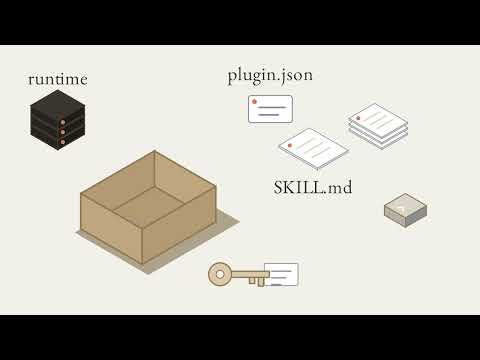
Here's the desk: a laptop runs the Claude app, on Mac or Windows. Beside it sits a tiny device with a screen and buttons. The app can connect Cowork and Claude Code sessions to it over Bluetooth. That bridge is off by default — you opt in. Turn on developer mode, open Hardware Buddy, click connect, and pick your device; after that, it reconnects on its own. It's for makers, not an official product feature.
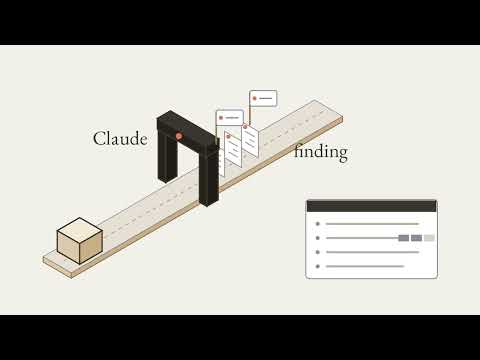
The app sends a snapshot whenever something changes, and every ten seconds anyway: how many sessions are running or waiting, plus a few recent transcript lines, newest first. The team's own example is a desk pet on an ESP32 board — it sleeps when nothing's happening, and wakes up when a session starts.
When Claude wants to run a Bash command, it needs permission. The snapshot carries a prompt: the tool, a short hint, and an ID. It shows up on the device too — the pet gets impatient, its light blinks. Press the front button, and the device sends back one line: that same ID, plus a decision, once. "Once" approves that one tool call; the other button sends deny. Approve quickly, and the pet shows hearts.
That link carries transcript snippets and tool hints, and an unencrypted connection can be read by anyone in radio range with a cheap dongle. So the reference requires encrypted pairing: the device shows a six-digit passkey, you type it into the app, and the link is encrypted from then on.
You don't need any of the existing code to build your own. REFERENCE.md is the contract: advertise the Nordic UART Service, a standard way to send text over Bluetooth, then trade one line of JSON at a time. An Arduino, or a Raspberry Pi with a Bluetooth dongle, will do. The repo's own advice: the best contribution is a fork.
Your Turn: Paste into Claude: "Here is REFERENCE.md from anthropics/claude-desktop-buddy: [paste it]. Help me plan a tiny device of my own that speaks this protocol: [your device]. List what its screen shows from each snapshot, which permission prompts it may approve with a button press, and what it must never do without a person. Plan only; no firmware yet." Then check two things yourself: find every approval in the plan and confirm each one is a button press, and open REFERENCE.md to confirm the plan's field names match it exactly.
Source: Anthropic, claude-desktop-buddy (README.md, REFERENCE.md, CONTRIBUTING.md)
0:00 The question, and three terms 0:20 The desk 0:31 Opting in 0:43 Snapshots and the desk pet 1:03 A permission prompt 1:15 Approve once, or deny 1:26 Pair it, encrypt it 1:42 REFERENCE.md is the contract 1:59 Your turn
Part of the Claude & Agentic AI series. @NikBearBrown
Deliberately Not Claimed
This video summarizes Anthropic's own published README, REFERENCE.md, and contributing guidelines for claude-desktop-buddy and does not claim to introduce new mechanics or supersede that source. It does not claim this is an official Anthropic product feature — the repository itself describes it as an opt-in, developer-mode API for makers. Protocol details, permission behavior, and supported hardware may change; check the linked repository for current, authoritative specifications.
SEO Keyword Tags
claude-desktop-buddy, Claude hardware, Bluetooth Low Energy Claude, ESP32 Claude project, Claude Code permission prompt, Claude Cowork BLE, maker API Claude, Nordic UART Service, Claude desk pet, Claude Code hardware companion, DIY Claude device, Anthropic reference repo, Arduino Claude Code, Raspberry Pi Bluetooth Claude, encrypted BLE pairing
What this video covers
- 0:00 — The question, and three terms 0:20 The desk 0:31 Opting in 0:43 Snapshots and the desk pet 1:03 A permission prompt 1:15 Approve once, or deny 1:26 Pair it, encrypt it 1:42 REFERENCE.md is the contract 1:59 Your turn
Transcript
A lightly formatted transcript of the video, with timestamps so you can jump to any section on YouTube.
The question, and three terms 0:20 The desk 0:31 Opting in 0:43 Snapshots and the desk pet 1:03 A permission prompt 1:15 Approve once, or deny 1:26 Pair it, encrypt it 1:42 REFERENCE.md is the contract 1:59 Your turn
[0:00] Hey, this is Liam in for Bear. Claude's desk buddy isn't a product feature. It's an opt-in API for makers, so the real question is how you build one. Three terms: BLE, Bluetooth Low Energy, a low-power wireless link, a permission prompt, Claude asking before it runs a tool, and a reference repo, one worked example made to be copied. Here's the desk. A laptop runs the Claude app on Mac or Windows. Beside it sits a tiny device with a screen and buttons. The app can connect your Cowork Claude code sessions to it over Bluetooth. That bridge is off by default and you opt in. Turn on developer mode, open hardware buddy, click connect, and pick your device. After that, it reconnects by itself. It's for makers, not an official product feature. Now the app sends a snapshot whenever something changes and every 10 seconds anyway. How many sessions are running or waiting, plus a few recent
Transcript lines, newest first. The tiny screen scrolls them. The team's own example is a desk pet on an ESP32 board. It sleeps when nothing's happening. Start a session and it wakes up. Now Claude wants to run a bash command and it needs your permission. The snapshot carries a prompt, the tool, a short hint, and an ID. It shows up on the device, too, and the pet gets impatient. Its light blinks. Press the front button and the device sends back one line, that same ID and the decision once once approves that one tool call. The other button sends deny. Approve quickly and the pet shows hearts. That link carries transcript snippets and tool hints, and an unencrypted one can be read by anyone in radio range with a cheap dongle. So the reference says to require encrypted pairing. The device shows a six-digit passkey. You type it into the app and the link is encrypted
From then on. And you don't need any of this code. reference.md is the contract. Advertise the Nordic UART service, a standard way to send text over Bluetooth, then trade one line of JSON a time. An Arduino or a Raspberry Pi with a Bluetooth dongle will do. The repo's own advice, the best contribution is a fork. Your turn. Paste this into Claude. Here is reference.md from Anthropic's Claude desktop buddy repo. Paste it. Help me plan a tiny device of my own that speaks this protocol. Name your device. List what its screen shows from each snapshot, which permission prompts it may approve with a button press, and what it must never do without a person. Plan only, no firmware yet. Then check two things yourself. Find every approval in the plan. Is each one a button press? And open reference.md. Do the plan's field names match it exactly? Claude on your desk at Nick Bear Brown.